
If you’re looking for a push to kindle alternative, you’re probably frustrated. The tool worked well for years — then formatting got inconsistent, the extension broke on certain sites, or you simply wanted something more. You’re not alone.
This guide covers the best alternatives available in 2026: what each one does well, where it falls short, and which is worth your time depending on how you read.
Why People Are Leaving Push to Kindle
Push to Kindle (pushtokindle.com) has been around since 2012. For a long time, it was the easiest way to send web articles to Kindle. But the landscape has shifted:
- The Chrome extension hasn’t been actively maintained
- Formatting quality varies wildly by site — some articles arrive broken or missing images
- No translation support for non-English content
- No article history or re-download
- The free tier is limited, and the paid tier is hard to justify
Two bigger context shifts make this the right time to switch:
Kindle now natively supports EPUB3. Amazon completed its transition away from MOBI/AZW3 in 2024. Tools built around the older format pipeline — including Push to Kindle — haven’t caught up. A modern replacement should output clean EPUB3 from the start.
Pocket shut down in January 2025. Mozilla closed Pocket, which also ended the Pocket–Kobo integration that Kobo users relied on for article delivery. Many of those readers are now looking for an alternative — and the options have improved significantly.
Want the fastest replacement —try HushRead, one click to Kindle or Kobo →The Best Push to Kindle Alternatives in 2026
1. HushRead — Best Overall
HushRead is a Chrome extension and iOS app that sends any web article to your Kindle or Kobo as a properly formatted EPUB3. It’s built specifically for eInk reading — the output is optimized for the screen it’s landing on, not just converted and hoped for the best.
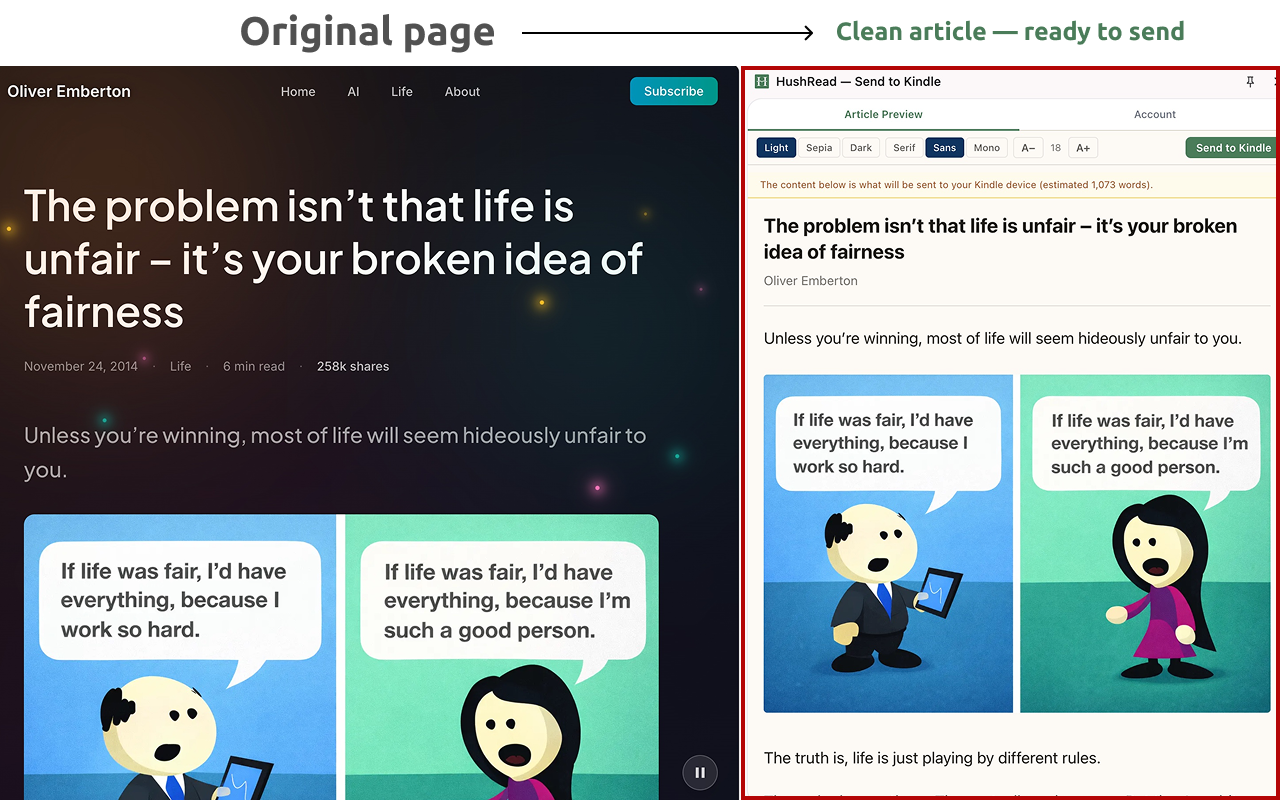
What makes it different:
The biggest differentiator is Bilingual Mode. If you read in a second language or are actively learning one, HushRead translates the article and delivers it as a bilingual EPUB: the full original text and full translation together, section by section. No other Kindle delivery tool does this.
Beyond translation, several things stand out compared to older tools:
- EPUB3 output — takes advantage of Kindle’s native format, not a legacy workaround
- Kobo support via Dropbox — fills the gap left by Pocket’s shutdown
- iOS app — send articles from your phone without opening a laptop
- 60-day article history — re-download anything you’ve sent within the past two months
How to set it up:
- Install the HushRead Chrome extension from the Web Store — or download the iOS app
- Open any article you want to read
- Click the extension icon — optionally choose a translation language
- The EPUB3 arrives on your Kindle or Kobo within seconds
Plans:
| Plan | Price | Articles/month | Translations/month |
|---|---|---|---|
| Starter | Free | 10 | 1 |
| Reader | $4.99/mo | Unlimited | 3 |
| Polyglot | $9.99/mo | Unlimited | 200 |
Bilingual Mode is available on all plans — it’s limited by how many articles you can translate, not locked to a specific tier.
Best for: Anyone who wants reliable, clean output and doesn’t want to think about it. Especially strong for language learners and Kobo users who lost Pocket.
2. Amazon’s Official “Send to Kindle” Extension
Amazon has its own Send to Kindle Chrome extension, and for basic use cases it works.
What it does well:
- Deep integration with your Kindle library
- Reliable delivery to any Kindle device or app
- Free — no account beyond your Amazon login
Where it falls short:
- Formatting is inconsistent on sites with complex layouts or paywalls
- Delivers in Amazon’s proprietary format, not clean EPUB3
- No translation, no article history
- Some sites block it entirely
- Kindle-only — no Kobo support
The output quality is noticeably below what dedicated tools produce, especially now that Kindle handles native EPUB3 — Amazon’s own extension ironically doesn’t take advantage of it.
Best for: Casual use. Amazon users who want zero extra setup.
3. Instapaper
Instapaper is a read-later service that includes Kindle delivery as a scheduled feature.
What it does well:
- Clean article extraction — strips ads and clutter reliably
- Delivers articles to Kindle on a daily or weekly schedule
- Has been around long enough to handle most edge cases well
- Web and mobile app for reading saved articles anywhere
Where it falls short:
- Kindle delivery requires a paid subscription ($3.99/month or $29.99/year)
- Not on-demand — you save first, it delivers later on its schedule
- No translation, no Kobo support
- The product has felt deprioritized since its acquisition; updates have slowed
Instapaper fits a specific workflow: save throughout the day, read a digest on Kindle each morning. If you want to send a specific article right now, it’s the wrong tool.
Best for: Readers who prefer batched digest delivery and already have a read-later habit.
4. Calibre (Manual Method)
Calibre is a free, open-source ebook management tool. With some setup, you can convert any article to EPUB and send it to Kindle yourself.
What it does well:
- Complete control over output — fonts, margins, metadata
- No subscription, no account, completely free
- Works with virtually any content: HTML, PDF, EPUB, MOBI
- Active community with plugins for most use cases
Where it falls short:
- Steep learning curve — not beginner-friendly
- Every article requires multiple manual steps
- Desktop app only, no browser integration
- Not practical if you send more than a handful of articles per month
Calibre is excellent if you already use it for managing your ebook library. As a Push to Kindle replacement for daily web reading, the friction is prohibitive.
Best for: Power users who already live in the Calibre ecosystem and want maximum control.
5. KTool.io
KTool is a focused Kindle delivery tool — the closest in scope to what Push to Kindle did, without the translation layer.
What it does well:
- Clean formatting for long-form articles
- RSS feed support — automatically delivers new posts from publications you follow
- Works across Chrome, Safari, and Firefox (broader browser support than most)
Where it falls short:
- No AI translation or bilingual mode
- No Kobo support
- Free tier is limited to 10 articles/month
- Update cadence has slowed
KTool is reasonable if you only need clean Kindle delivery and don’t need translation. It’s the closest like-for-like replacement for Push to Kindle in terms of scope. If you read across languages or follow newsletters in your target learning language, you’ll hit its ceiling quickly.
Best for: Monolingual readers who want a direct Push to Kindle replacement with no extra features.
Side-by-Side Comparison
| Tool | One-click | EPUB3 output | AI Translation | Bilingual Mode | Kobo support | iOS app | Free tier |
|---|---|---|---|---|---|---|---|
| HushRead | ✓ | ✓ | ✓ | ✓ | ✓ | ✓ | ✓ |
| Amazon Send to Kindle | ✓ | ✗ | ✗ | ✗ | ✗ | ✗ | ✓ |
| Instapaper | Partial | ✓ | ✗ | ✗ | ✗ | ✓ | Limited |
| Calibre | ✗ | ✓ | ✗ | ✗ | ✓ | ✗ | ✓ |
| KTool.io | ✓ | Partial | ✗ | ✗ | ✗ | ✗ | ✓ |
Which Alternative Should You Use?
Use HushRead if you want one-click delivery with clean EPUB3 output, any translation capability, or Kobo support. The free Starter plan (10 articles/month, 1 translation) is enough to test the full workflow before committing. If you lost Pocket and need a Kobo workflow, HushRead is currently the most complete replacement.
Use Amazon’s extension if you send a few articles per month and formatting quality isn’t a priority. Zero setup.
Use Instapaper if you already save articles throughout the day and prefer a scheduled digest delivery on Kindle each morning.
Use Calibre if you’re already in the Calibre ecosystem and want full manual control over every conversion.
Use KTool if you want a no-frills, direct replacement for Push to Kindle and have no need for translation or Kobo support.
If you’re a language learner, HushRead is the only option worth considering — none of the others support bilingual reading, and that feature alone changes what’s possible on an eInk device.
Frequently Asked Questions
Is Push to Kindle still working in 2026?
Partially. The extension still functions on some sites, but reliability has declined — particularly on JavaScript-heavy layouts, sites with strict content security policies, and paywalled content. Many users report broken formatting on articles that previously worked fine. It also hasn’t been updated to take advantage of Kindle’s native EPUB3 support.
What happened to Pocket for Kobo?
Mozilla shut down Pocket in January 2025, which ended the Pocket–Kobo integration that many readers relied on for article delivery to their Kobo devices. HushRead delivers to Kobo via Dropbox — your EPUB lands in your Kobo’s designated folder automatically. It’s currently one of the only maintained alternatives for Kobo users who want article delivery comparable to what Pocket offered.
What’s the best free Push to Kindle alternative?
HushRead’s free Starter plan gives you 10 articles per month, 1 translation, and full Bilingual Mode access. Amazon’s official extension is free with no monthly cap, but the formatting quality is lower and it doesn’t output native EPUB3. For most readers, HushRead’s free tier is the more useful starting point.
Does Kindle support EPUB now?
Yes. Amazon completed its transition to native EPUB3 support in 2024. You can send EPUB files directly to any Kindle via the @kindle.com email address, and they display natively without conversion. Tools that output clean EPUB3 take full advantage of this; older tools still using the MOBI pipeline do not. See Amazon’s official Send to Kindle documentation for the current supported formats.
Can I translate articles before sending to Kindle?
Only HushRead supports AI translation as part of the delivery workflow. You can translate into over a dozen languages and optionally enable Bilingual Mode, which delivers both the original and translated text in the same EPUB.
Do any Push to Kindle alternatives work on iPhone?
HushRead has an iOS app — paste a URL, choose a language, tap Send. The EPUB arrives on your Kindle within seconds, no laptop required. Most other Kindle delivery tools are Chrome-extension-only, which limits them to desktop workflows.
Does HushRead replace Pocket for Kobo users?
For the core use case — send a web article to your Kobo to read later — yes. HushRead delivers EPUB3 files to Kobo via Dropbox, which is how Kobo reads sideloaded content. The workflow is slightly different from Pocket’s (Pocket synced wirelessly; HushRead uses your Kobo’s Dropbox folder), but the end result is the same: the article is on your device, formatted for reading.
The Bottom Line
Push to Kindle had a good run. But in 2026 — with Kindle natively supporting EPUB3, Pocket shut down, and AI translation now accessible at near-zero cost — there are better-maintained options built for how reading actually works now.
If you want a straightforward replacement, HushRead matches the Push to Kindle workflow and goes further: cleaner output, Kobo support, translation, and a Bilingual Mode that no other delivery tool currently offers.
Replace Push to Kindle in 30 seconds.
Try HushRead free →